Showing posts with label Android. Show all posts
Android dress code: wear what you want
Posted by Unknown in Android on Wednesday, December 10, 2014
Deciding what to wear is a really personal thing—it’s one of the ways you show people what you’re about. Wearable technology is no different, so Android Wear offers a wide selection of apps and watches to suit your taste. It’s about expressing who you are, however you want, right on your wrist.
Today there’s even more ways to show your style with Android Wear, including dozens of new watch faces (powered by an official Watch Face API), a full collection of devices on Google Play, and lots of other improvements based on your feedback. So try ‘em on for size, and let us know what you think.

Starting today you can download watch faces from Google Play, just like you do with apps. We’ve got dozens of examples to get you started—from the unpredictable Minions in Despicable Me to the X-Ray artistry of Hugh Turvey. And because the new Watch Face API is available to all developers, you can expect even more choices in the weeks and months ahead.
We’ve also updated the Android Wear app on your phone to make browsing, downloading, and switching watch faces really easy. So pick the one you like the best, or pick a new one every day.
(Both updates are rolling out over the next week, so don’t worry if you don’t see them yet.)
Examples of Android Wear watch faces
A family of watches to choose from
In only a few short months, the Android Wear collection has grown to include six unique watches—the ASUS ZenWatch, the LG G Watch, the LG G Watch R, the Moto 360, the Samsung Gear Live, and the Sony SmartWatch 3. Some are circular, others are square. Some are traditional, others are sporty. And that’s exactly the point. With different shapes and styles, it’s really easy to make your watch your own.
So by all means: wear what you want.
Android: Be together. Not the same.
Posted by Unknown in Android on Wednesday, October 15, 2014
Good things happen when everybody’s invited. A few years ago, we had the thought that phones (and stuff that hadn’t even been invented yet like tablets and smart watches) would be way more interesting if everyone could build new things together. So we created Android as an open platform, and put it out there for everyone to imagine, invent, make, or buy whatever they wanted.
Since then, all kinds of people—from companies big and small to folks on Kickstarter, kids in schools, and crazy smart developers—have been innovating faster, together, more than we ever could alone. And the best part is that every time someone new joins in, things get more interesting, unexpected, and wonderful for all of us.
Joining the party: Android 5.0 Lollipop
As previewed at Google I/O, Lollipop is our largest, most ambitious release on Android with over 5,000 new APIs for developers. Lollipop is designed to be flexible, to work on all your devices and to be customized for you the way you see fit. And just like Android has always been, it’s designed to be shared.

Lollipop is made for a world where moving throughout the day means interacting with a bunch of different screens—from phones and tablets to TVs. With more devices connecting together, your expectation is that things just work. With Lollipop, it’s easier than ever to pick up where you left off, so the songs, photos, apps, and even recent searches from one of your Android devices can be immediately enjoyed across all the other ones.
As you switch from one screen to another, the experience should feel the same. So Lollipop has a consistent design across devices—an approach we call Material Design. Now content responds to your touch, or even your voice, in more intuitive ways, and transitions between tasks are more fluid.
Lollipop also gives you more control over your device. You can now adjust your settings so that only certain people and notifications can get through, for example, when you’re out to dinner or in the middle of an important meeting. And when an important notification does come through, you can see it directly from the lockscreen.
And because we’re using our devices a lot more, there’s a new battery saver feature that extends the life of your device by up to 90 minutes—helpful if you’re far from a power outlet. We’ve enabled multiple user accounts and guest user mode for keeping your personal stuff private. And you can now secure your device with a PIN, password, pattern, or even by pairing your phone to a trusted device like your watch or car with Smart Lock. But this is just a small taste of Lollipop. Learn more on android.com.
Meet the Nexus family, now running Lollipop
Advances in computing are driven at the intersection of hardware and software. That's why we’ve always introduced Nexus devices alongside our platform releases. Rather than creating software in the abstract, we work with hardware partners to build Nexus devices to help push the boundaries of what's possible. Nexus devices also serve as a reference for the ecosystem as they develop on our newest release. And for Lollipop, we have a few new Nexus treats to share with you.

Next, a new tablet built in partnership with HTC. Nexus 9, with brushed metal sides and 8.9-inch screen, is small enough to easily carry around in one hand, yet big enough to work on. And since more and more people want to have the same simple experience they have on their tablets when they have to do real work, we designed a keyboard folio that magnetically attaches to the Nexus 9, folds into two different angles and rests securely on your lap like a laptop.
Finally, we’re releasing the first device running Android TV: Nexus Player, a collaboration with Asus, is a streaming media player for movies, music and videos. It's also a first-of-its-kind Android gaming device. With Nexus Player you can play Android games on your HDTV with a gamepad, then keep playing on your phone while you're on the road. Nexus Player is Google Cast Ready so you can cast your favorite entertainment from almost any Chromebook or Android or iOS phone or tablet to your TV.
Nexus 9 and Nexus Player will be available for pre-order on October 17. Nexus 9 will be in stores starting November 3. Nexus 6 will be available for pre-order in late October and in stores in November—with options for an unlocked version through Play store, or a monthly contract or installment plan through carriers, including AT&T, Sprint, T-Mobile, U.S. Cellular, and Verizon. Specific carrier rollout timing will vary. Check out google.com/nexus for more details on availability.
Android 5.0 Lollipop, which comes on Nexus 6, Nexus 9 and Nexus Player, will also be available on Nexus 4, 5, 7, 10 and Google Play edition devices in the coming weeks.
The party’s just getting started
With this latest release of Android Lollipop, we're excited to continue working with our developer community, hardware partners, and all of you. More ideas and more creators is what gets us all to better ideas faster. And since everyone's invited to the party, we hope you'll join in the fun by creating and sharing an Android character that captures a little bit of who you are—one of a kind. Enjoy!
[ABI]: VoLTE (w/IMS) is the Next Big Thing; $30B Market to 2019
Posted by Unknown in ABI Research, Alcatel-Lucent, Android, Apple, Cisco, Ericsson, Huawei, IMS, Nokia Siemens Networks, VoLTE on Monday, September 29, 2014
A new report by Sabir Rafiq [pictured], research analyst, ABI Research finds that ".. as the first wave of LTE deployments achieve coverage, VoLTE is the next big thing. VoLTE runs on IMS, and the market will total over $US30 billion through 2019 as it becomes widespread.
Leading infrastructure vendors such as Ericsson and Nokia are fully committed to VoLTE and IMS space and equip
For the next five billion: Android One
Posted by Unknown in Android on Monday, September 15, 2014
Knowledge is a game changer. I’ve long been inspired by the Internet and how it opens the doors to opportunity. It provides access to knowledge, no matter who you are or where you are. For instance, it doesn’t matter if you’re a Nobel Laureate at a world-class research center or a young student at a rural school in Indonesia, with Google Search, you have the same information at your fingertips as anyone else.
If we look at how people are getting online and accessing information today, increasingly it’s through a smartphone. While 1.75 billion people around the world already have a smartphone, the vast majority of the world’s population—over five billion more—do not. That means most people are only able to make simple voice calls, rather than connect with family through a live video chat, use mapping apps to find the closest hospital, or simply search the web. We want to bring these experiences to more people.
That’s where Android One comes in. At I/O, we first talked about this initiative to make high-quality smartphones accessible to as many people as possible. And today we’re introducing the first family of Android One phones in India.

There are three big reasons why it’s hard for people in countries such as India, Indonesia or the Philippines to get their hands on a high-quality smartphone. First, is the hardware itself. Even entry-level smartphones still remain out of reach for many (bear in mind that in some of these countries the average monthly income is around $250). Second, many people in these markets do not have access to the latest Android software and popular applications. Finally, even where 3G and 4G networks are available, not enough people have phones that can support data and the plans can be expensive.
Android One aims to help tackle these challenges. By working closely with phone and silicon chip makers to share reference designs and select components, we’re making it easier for our partners to build phones that are not just great to use, but also affordable. They have lots of processing power, so you can get information quickly. They have high-quality front- and rear-facing cameras. And for all those pictures, along with your apps and videos, Android One phones will have expandable storage. We also added features that people in India will find particularly useful, like dual SIM cards, a replaceable battery and built-in FM radio.

In an effort to reduce data costs, if you have an Airtel SIM card, you’ll get these software updates for free for the first six months. As part of this same Airtel offer, you’ll also be able to download up to 200MB per month worth of your favorite apps (that’s about 50 apps overall) from Google Play—all without counting toward your mobile data usage.
More to come
This is just the beginning of the Android One journey. The first phones, from our hardware partners Micromax, Karbonn, Spice and chipmaker MediaTek, are available starting today in India from leading retailers starting at Rs 6,399. We’re also excited to welcome more partners to the program, including phone manufacturers Acer, Alcatel Onetouch, ASUS, HTC, Intex, Lava, Lenovo, Panasonic, Xolo, and chipmaker Qualcomm. We expect to see even more high-quality, affordable devices with different screen sizes, colors, hardware configurations and customized software experiences. Finally, we plan to expand the Android One program to Indonesia, the Philippines and South Asia (Bangladesh, Nepal, Pakistan, and Sri Lanka) by the end of the year, with more countries to follow in 2015.
Access for access’s sake is not enough. With Android One, we not only want to help people get online, we want to make sure that when they get there, they can tap into the wealth of information and knowledge the web holds for everyone.
Android Wear, moving forward like clockwork
Posted by Unknown in Android on Friday, September 5, 2014
Earlier this year, we launched Android Wear, bringing Android to wearables. Since then, the first watches powered by Android Wear, the LG G Watch and Samsung Gear Live, have gone on sale, developers have already built thousands of apps enhanced for Wear, and great new watches are becoming available from more partners.
Our goal with Wear is to build technology that helps you connect with others and get stuff done. So often, technology can become something that gets in the way of everything else. But we want to build devices that you can use when you need and forget about when you don’t—technology that's built for your sake, rather than its own sake. Coming throughout the rest of this year, we're making some updates to Wear that will help you get even more out of your watch—and the rest of your life, too.
First, we're bringing offline music playback and GPS support to Android Wear. Go for a run or bike ride with your Android wearable and leave your phone at home. You’ll be able to listen to music stored on your watch via Bluetooth headphones. And if your watch includes a GPS sensor, you can track your distance and speed too.
The second update will enable downloadable watch faces, so you can customize the visual design of your watch's home screen to show the information you want to see most—like your calendar or fitness sensors. Developers will soon be working on watch faces, making them available on Google Play.
We’re also continuing to work with manufacturers to bring you even more watch options, with different shapes, styles and sensors.
- The Moto 360, the first Android wearable with a round display, is now available for sale in the U.S.
- The Asus Zen Watch, coming later this year, includes a bio sensor, so you can keep tabs on your fitness and relaxation levels throughout the day.
- The LG G Watch R uses a circular display, includes a heart rate monitor, and will be available later this year.
- Last, but not least, we’re happy to welcome Sony to the Android Wear family with the Sony SmartWatch 3. It uses a transflective display for easier readability in sunlight, includes a GPS sensor, and will be available later this year.

Whether it's giving you directions, letting you stay in touch more easily or keeping track of your steps so you can stay fit, Wear is designed to help you out without getting in your way. With new features and many new devices to choose from, chances are there's a watch that's just right for you.
Sharing what’s up our sleeve: Android coming to wearables
Posted by Unknown in Android on Tuesday, March 18, 2014
Most of us are rarely without our smartphones in hand. These powerful supercomputers keep us connected to the world and the people we love. But we're only at the beginning; we’ve barely scratched the surface of what’s possible with mobile technology. That’s why we’re so excited about wearables—they understand the context of the world around you, and you can interact with them simply and efficiently, with just a glance or a spoken word.
Android Wear: Information that moves with you
Today we’re announcing Android Wear, a project that extends Android to wearables. And we’re starting with the most familiar wearable—watches. Going well beyond the mere act of just telling you the time, a range of new devices along with an expansive catalogue of apps will give you:
- Useful information when you need it most. Android Wear shows you info and suggestions you need, right when you need them. The wide variety of Android applications means you’ll receive the latest posts and updates from your favorite social apps, chats from your preferred messaging apps, notifications from shopping, news and photography apps, and more.
- Straight answers to spoken questions. Just say “Ok Google” to ask questions, like how many calories are in an avocado, what time your flight leaves, and the score of the game. Or say “Ok Google” to get stuff done, like calling a taxi, sending a text, making a restaurant reservation or setting an alarm.
- The ability to better monitor your health and fitness. Hit your exercise goals with reminders and fitness summaries from Android Wear. Your favorite fitness apps can give you real-time speed, distance and time information on your wrist for your run, cycle or walk.
- Your key to a multiscreen world. Android Wear lets you access and control other devices from your wrist. Just say “Ok Google” to fire up a music playlist on your phone, or cast your favorite movie to your TV. There’s a lot of possibilities here so we’re eager to see what developers build.
If you’re a developer, there’s a new section on developer.android.com/wear focused on wearables. Starting today, you can download a Developer Preview so you can tailor your existing app notifications for watches powered by Android Wear. Because Android for wearables works with Android's rich notification system, many apps will already work well. Look out for more developer resources and APIs coming soon. We’re also already working with several consumer electronics manufacturers, including Asus, HTC, LG, Motorola and Samsung; chip makers Broadcom, Imagination, Intel, Mediatek and Qualcomm; and fashion brands like the Fossil Group to bring you watches powered by Android Wear later this year.
Opera Expands Optimization Beta Test
Posted by Unknown in Android, Opera Software, Optimization on Thursday, February 20, 2014
Opera Software announced in its blog that Opera Max for Android will be available to more beta testers: " In December last year, we opened up Opera Max to a limited number of Android beta testers in the USA to see how you enjoy our new data-savings app.
Well, it seems like many of you like it, and now we want more testers. Starting today, we’re rolling out pre-registration of a public beta
[Amdocs]: Newer Smartphones are Hungriers (for Data)
Posted by Unknown in Actix, amdocs, Android, Apple, broadband statistics, smartphone on Wednesday, January 15, 2014
Actix (recently acquired by Amdocs) reported some interesting findings from a research it has conducted during 2013 analyzing 100,000 devices in Europe and North America:
"Smartphones launched in 2013 consumed more than seven times the data of those launched in 2009 and 40 percent more data than 2012 models, according to Actix’s latest research on global mobile users
Apple handsets dominate
Citrix: Mobile Ads Generate 1.6% of iOS/ 2.2% of Android Data Volume
Posted by Unknown in Android, Apple, broadband statistics, Bytemobile, citrix on Tuesday, November 5, 2013
Citrix Bytemobile published its "Mobile Analytics Report, November 2013" (here) that "provides insight into subscriber behavior and related factors that affect subscribers’ quality of experience (QoE) with mobile data services".
Main findings:
Three applications - Media Player, Browser and Google Play - generate 83% of mobile data volume associated with Android devices, with Media Player
Android for all and the new Nexus 5
Posted by Unknown in Android on Thursday, October 31, 2013
 Just in time for Halloween, we have two new treats for Android fans. First, we're excited to unwrap our latest platform release, KitKat, which delivers a smarter, more immersive Android experience to even more people. And second, we're introducing Nexus 5—a new Nexus phone developed with LG.
The first thing you’ll notice about KitKat is we’ve made the experience much more engaging: the book you're reading, the game you're playing, or the movie you're watching—now all of these take center stage with the new immersive mode, which automatically hides everything except what you really want to see.
Bringing more Google smarts to Android
Behind the polish on the screen is the power under the hood. Take the Phone app, which for most people hasn’t really changed since the days of flip phones. Now, we’re making calling easier than ever, by helping you search across your contacts, nearby places, or even Google Apps accounts (like your company’s directory), directly from within the app. And with the new Hangouts app, all of your SMS and MMS messages are together in the same place, alongside your other conversations and video calls, so you’ll never miss a message no matter how your friends send it. This is just a small taste of KitKat—learn more on our site.
Google has always focused on helping users get immediate access to the information they need, and we want to bring this same convenience and power to users on Android. With the new Nexus 5 launcher, Google smarts are deeply integrated into the phone you carry around with you, so getting to the information you need is simple, easy and fast. Swipe once from the home screen to get Google Now literally at your fingertips. Put Google to work for you by saying “OK, Google” to launch voice search, send a text, get directions or even play a song you want to hear. And in the coming weeks, we’re enhancing Now with important new card types that bring you information about contextual topics that interest you such as updates from a favorite website or blog.
Reaching the next 1 billion users
Building a platform that makes mobile phones accessible for everyone has always been at the heart of Android. Until now, some lower-end Android phones couldn't benefit from more recent Android releases due to memory constraints. With KitKat, we've slimmed down Android’s memory footprint by doing things like removing unnecessary background services and reducing the memory consumption of features that you use all the time. We did this not only within Android but across Google services like Chrome and YouTube. RAM (or memory) is one of the most expensive parts of a phone, and now Android can run comfortably on the 512MB of RAM devices that are popular in much of the world, bringing the latest goodies in Android 4.4 within reach for the next billion smartphone users.
Introducing Nexus 5
Along with our sweet naming tradition, we also introduce a new device with each platform release to showcase the latest Android innovations. For KitKat, we partnered with LG to develop Nexus 5 -- the slimmest and fastest Nexus phone ever made. Its design is simple and refined to showcase the 5” Full HD display. Nexus 5 also keeps you connected at blazing speeds with 4G/LTE and ultra fast wifi. The advanced new lens on Nexus 5 captures more light for brighter night and sharper action shots. And with optical image stabilization, you no longer have to worry about shaky hands and blurry pictures. A new HDR+ mode automatically snaps a rapid burst of photos and combines them to give you the best possible single shot. Learn more on our site.
Android 4.4, KitKat, which comes on Nexus 5, will also soon be available on Nexus 4, 7, 10, the Samsung Galaxy S4 and HTC One Google Play edition devices in the coming weeks.
How’s that for a treat?
Dude, where’s my phone? Simple steps to protect your Android device this summer.
Posted by Unknown in Android, security and safety tips on Friday, August 2, 2013
This summer we’re posting regularly with privacy and security tips. Knowing how to stay safe and secure online is important, which is why we created our Good to Know site with advice and tips for safe and savvy Internet use. -Ed.
With summer vacation in full swing, you’re likely out and about, using your smartphone or tablet to get answers on the go or check out the latest cool apps and games. But you don’t have to leave safety at home! In this post, we’re sharing a few tips and tools that you can easily set up if you’re on an Android phone or tablet to keep your device—and the contents inside—safe and secure, including a new service that makes it easy to locate a misplaced device.
1. Lock your device screen. Whether you’re on a phone or a tablet, it’s easy to set up a screen lock. This is important to do in case your device gets left in the back of a car, or you’re worried about someone picking up your phone and scrolling through your stuff. You can lock your device with a pin, password, pattern (or even your face!) by going to Settings > Personal > Security > Screen Lock.

3. Locate, ring and wipe a misplaced device. Have you ever lost your phone in between the couch cushions or left it in a restaurant? Later this month, you will be able to use a new service called Android Device Manager, which can quickly ring your phone at maximum volume so you can find it (even if it’s been silenced), or locate it on a map, in real time, using Android Device Manager. If your phone can’t be recovered, or has been stolen, you can quickly and securely erase all of the data on your device to keep your data from ending up in the wrong hands. The Android Device Manager will be available for devices running Android 2.2 and above, as part of Google Play. You can read the full announcement on the Android blog.

From TVs to tablets: Everything you love, across all your screens
When I was growing up, my family had a single screen we huddled around every day: the television set in the living room. Nowadays, we “huddle” around multiple screens—laptops, smartphones and tablets—using them almost interchangeably as we navigate through our day. In a world of ubiquitous computing, life would be a lot simpler if we didn’t have to learn new behaviors and interfaces each time we switched screens—if we could have one consistent, intuitive experience no matter where we are or what we’re doing. Today, with the launch of Chromecast and the new Nexus 7 tablet, it’s even more effortless to enjoy content you care about—whether it’s video, music, movies, games—wherever you are, across your devices.
Introducing Chromecast
To help make it easy to bring your favorite online entertainment to the biggest screen in your house—the TV—we’re introducing Chromecast. Chromecast is a small and affordable ($35) device that you simply plug in to your high-definition (HD) TV and it allows you to use your phone, tablet or laptop to "cast" online content to your TV screen. It works with Netflix, YouTube, Google Play Movies & TV, and Google Play Music, with more apps like Pandora coming soon. With Chromecast, we wanted to create an easy solution that works for everyone, for every TV in the house.

Remote-free
Once your Chromecast is set up, you can use your phone, tablet or laptop to browse and cast content to your TV, play and pause, control the volume, and more. But unlike other streaming solutions, you can still multitask—send emails or surf the web—while enjoying what’s on the TV screen. It works across platforms—Android tablets and smartphones, iPhones, iPads, Chrome for Mac and Windows (more to come), so your personal device is also now your remote control.
Cast the web to your TV
In addition to apps like Netflix, you can use Chromecast to bring a broad range of content available on the web to your big screen, thanks to a new feature in the Chrome browser that allows you to project any browser tab to your TV. From sharing your family photos to enjoying a video clip from your favorite news site, it’s as simple as pressing a button. This feature is launching in beta, but we’re excited for people to try it out and give us their feedback.
Google Cast SDK preview for developers
To ensure a great Chromecast experience over time, we've built Google Cast, a technology that enables developers to build consistent, intuitive multi-screen experiences across mobile devices and TVs. Today, we’re launching a preview version of Google Cast with more information for developers on our Google Developers blog. A handful of early developers are already working on enabling Google Cast technology in their apps, so more supported apps are coming soon. And while the Chromecast device is the first instantiation of Google Cast, we expect the technology to be embedded in a range of hardware from our partners in the future.

Together with ASUS, we took what you loved about the original Nexus 7 and made it even better. The first thing you’ll notice is the sharpness of the screen: the 323 pixels packed into every inch of the screen makes it the world's highest-resolution 7-inch tablet. It’s lighter than ever, with more than nine hours of HD video playback and 10 hours of web browsing or reading. Nexus 7 now features stereo speakers and virtual surround sound from Fraunhofer (the inventors of the MP3 format), giving you rich and immersive audio.
Android 4.3—a sweeter Jelly Bean
Nexus 7 is the first device to ship with Android 4.3, the newest version of Android. Tablets are perfect for sharing with others, so in Android 4.3, we're introducing restricted profiles, which let you limit access to apps and content. For example, restricted profiles enable parental controls, so certain family members are prevented from accessing mature content. Likewise, retail stores can use tablets to show off product information, and shops can use tablets as point of sale systems. Android 4.3 also now supports Bluetooth Smart technology, opening the door to mobile apps that connect to new devices like fitness sensors. Android 4.3 is rolling out to Nexus devices starting today.
Ready to Play
The new Google Play Games app brings your friends together with the games you love, where you can invite a friend and start challenging gamers around the world, compete for top achievements, and race to the top of the leaderboard. You can also enjoy the world’s largest collection of eBooks, listen to millions of music tracks and immerse yourself in thousands of movies, TV shows, magazines and apps on Google Play. Plus, Nexus 7 comes loaded with your favorite Google apps, like Chrome, Maps, YouTube, Gmail and Google Now.
How to get Chromecast and the new Nexus 7
Starting today, the Chromecast device is available for $35 on Google Play, Amazon.com and BestBuy.com. It will be available in Best Buy stores across the U.S. starting July 28. For a limited time, you also get three months of Netflix included. More info available in Google Play.
Nexus 7 starts at $229, and is available in the U.S. beginning July 30 (with more countries coming soon!). Buy Nexus 7 online on Google Play, or check it out at Best Buy, Gamestop, Walmart, Staples, Office Max, Office Depot, Amazon, Home Shopping Network, Radio Shack, J&R and B&H Photo. Nexus 7 (LTE) is coming soon with support for T-Mobile and Verizon in the coming weeks. Learn more on our Nexus site.
A new Google Maps app for smartphones and tablets
Posted by Unknown in Android, maps and earth, Mobile on Wednesday, July 10, 2013
Today we’re introducing a new Google Maps app for Android smartphones and tablets, also coming soon to iPhone and iPad. It’s a new mapping experience that makes exploring the world and getting to the places that matter to you a lot faster and easier. The app is gradually rolling out globally in Google Play and will be available soon in the App Store.
The new Google Maps for mobile builds on the design we released for iPhone last December and improves on it with a few useful search and navigation features. And it's the first dedicated app for Android tablets and iPads. We’re also retiring Latitude and are making some changes to offline and My Maps which we’ll explain in more detail below.
First, here are a few highlights that make this release stand out:
Explore: Explore is a fast and easy way to visually browse and discover new places without even typing. Simply tap the search box and you’ll see cards showing great places to eat, drink, sleep and shop.


One important change you should know about is that Latitude and check-ins will be retired. These features will no longer be a part of the new Google Maps app, and will stop functioning in older versions by August 9. We understand some of you still want to see your friends and family on a map, which is why we've added location sharing and check-ins to Google+ for Android (coming soon to iOS). More details about Latitude and check-in changes can be found in our help center.
The offline maps feature for Android is also no longer available. Instead we’ve created a new way for you to access maps offline by simply entering “OK Maps” into the search box when viewing the area you want for later. Finally, My Maps functionality is not supported in this release but will return to future versions of the app. People who want to create powerful custom maps can still do so with Maps Engine Lite on desktop.
Helping you find great places is what we love to do. And as more of us use mobile phones and tablets in our daily lives, information that’s useful to you isn't just about what you need, but also where you might find it. Today’s update is an exciting step forward for Google’s maps—one that we hope will make it faster and easier for you to explore and discover places you want to go.
Update July 16: The new Google Maps app for iPhone and iPad is now live. Visit the App Store today to download it.
*The new Google Maps for mobile is compatible with Ice Cream Sandwich and Jelly Bean Android devices and iOS 6+ when available. Please note some of the features mentioned in this post aren’t available in all countries.
Live from Google I/O: Mo’ screens, mo’ goodness
Posted by Unknown in Android, chrome, developers, events, maps and earth, Search on Wednesday, May 15, 2013
This morning, we kicked off the 6th annual Google I/O developer conference with over 6,000 developers at Moscone Center in San Francisco, 460 I/O Extended sites in 90 countries, and millions of you around the world who tuned in via our livestream. Over the next three days, we’ll be hosting technical sessions, hands-on code labs, and demonstrations of Google's products and partners' technology.
We believe computing is going through one of the most exciting moments in its history: people are increasingly adopting phones, tablets and newer type of devices. And this spread of technology has the potential to make a positive impact in the lives of people around the world—whether it's simply helping you in your daily commute, or connecting you to information that was previously inaccessible.
This is why we focus so much on our two open platforms: Android and Chrome. They enable developers to innovate and reach as many people as possible with their apps and services across multiple devices. Android started as a simple idea to advance open standards on mobile; today it is the world’s leading mobile platform and growing rapidly. Similarly, Chrome launched less than five years ago from an open source project; today it’s the world’s most popular browser.
In line with that vision, we made several announcements today designed to give developers even more tools to build great apps on Android and Chrome. We also shared new innovations from across Google meant to help make life just a little easier for you, including improvements in search, communications, photos, and maps.
Here’s a quick look at some of the announcements we made at I/O:
- Android & Google Play: In addition to new developer tools, we unveiled Google Play Music All Access, a monthly music subscription service with access to millions of songs that joins our music store and locker; and the Google Play game services with real-time multiplayer and leaderboards. Also, coming next month to Google Play is a special Samsung Galaxy S4, which brings together cutting edge hardware from Samsung with Google’s latest software and services—including the user experience that ships with our popular Nexus devices.
- Chrome: With over 750 million active users on Chrome, we’re now focused on bringing to mobile the speed, simplicity and security improvements that we’ve seen on the desktop. To that end, today we previewed next-generation video codec VP9 for faster video-streaming performance; the requestAutocomplete API for faster payments; and Chrome Experiments such as "A Journey Through Middle Earth" and Racer to demonstrate the ability to create immersive mobile experiences not possible in years past.
- Google+: We unveiled the newly designed Google+, which helps you easily explore content as well dramatically improve your online photo experience to give you crisp, beautiful photos—without the work! We also upgraded Google+ Hangouts—our popular group video application—to help bring all of your real-life conversations online, across any device or platform, and with groups of up to 10 friends.
- Search: Search has evolved considerably in recent years: it can now have a real conversation with you, and even make your day a bit smoother by predicting information you might need. Today we added the ability to set reminders by voice and we previewed “spoken answers” on laptops and desktops in Chrome—meaning you can ask Google a question and it will speak the answer back to you.
- Maps: Today we previewed the next generation of Google Maps, which gets rid of any clutter in order to put your individual experience and exploration front and center. Each time you click or search, our technology draws you a tailored map that highlights the information you need. From design to directions, the new Google Maps is smarter and more useful.
Technology can have a profound, positive impact on the daily lives of billions of people. But we can’t do this alone—developers play a crucial role. I/O is our chance to come together and thank you for everything you do.
Best Android apps free download
Posted by Unknown in Android, Download, Mobile Apps on Wednesday, March 27, 2013
1. MessageMe

2. Skype WiFi

3. Dragon Summoner

4. Svpply

5. Spacecraft 3D

6. Instructables

7. WeVideo

8. Swarmly

9. Material

10. NewsWhip

Android OS has a significant role in the growing world of technology. It has become the world’s foremost Smartphone platform. As Android is getting popularity over years, Android apps will also have much impact. So, we can look forward for more and more apps that increase our concern in future.
Google Keep—Save what’s on your mind
Every day we all see, hear or think of things we need to remember. Usually we grab a pad of sticky-notes, scribble a reminder and put it on the desk, the fridge or the relevant page of a magazine. Unfortunately, if you’re like me you probably often discover that the desk, fridge or magazine wasn’t such a clever place to leave the note after all...it’s rarely where you need it when you need it.
To solve this problem we’ve created Google Keep. With Keep you can quickly jot ideas down when you think of them and even include checklists and photos to keep track of what’s important to you. Your notes are safely stored in Google Drive and synced to all your devices so you can always have them at hand.
If it’s more convenient to speak than to type that’s fine—Keep transcribes voice memos for you automatically. There’s super-fast search to find what you’re looking for and when you’re finished with a note you can archive or delete it.
Changing priorities isn’t a problem: just open Keep on your Android phone or tablet (there’s a widget so you can have Keep front and center all the time) and drag your notes around to reflect what matters. You can choose the color for each note too.
Pro tip: for adding thoughts quickly without unlocking your device there's a lock screen widget (on devices running Android 4.2+).


Google Keep is available on Google Play for devices running Android 4.0, Ice Cream Sandwich and above. You can access, edit and create new notes on the web at http://drive.google.com/keep and in the coming weeks you'll be able to do the same directly from Google Drive.
Celebrating Google Play’s first birthday
Posted by Unknown in Android on Wednesday, March 6, 2013
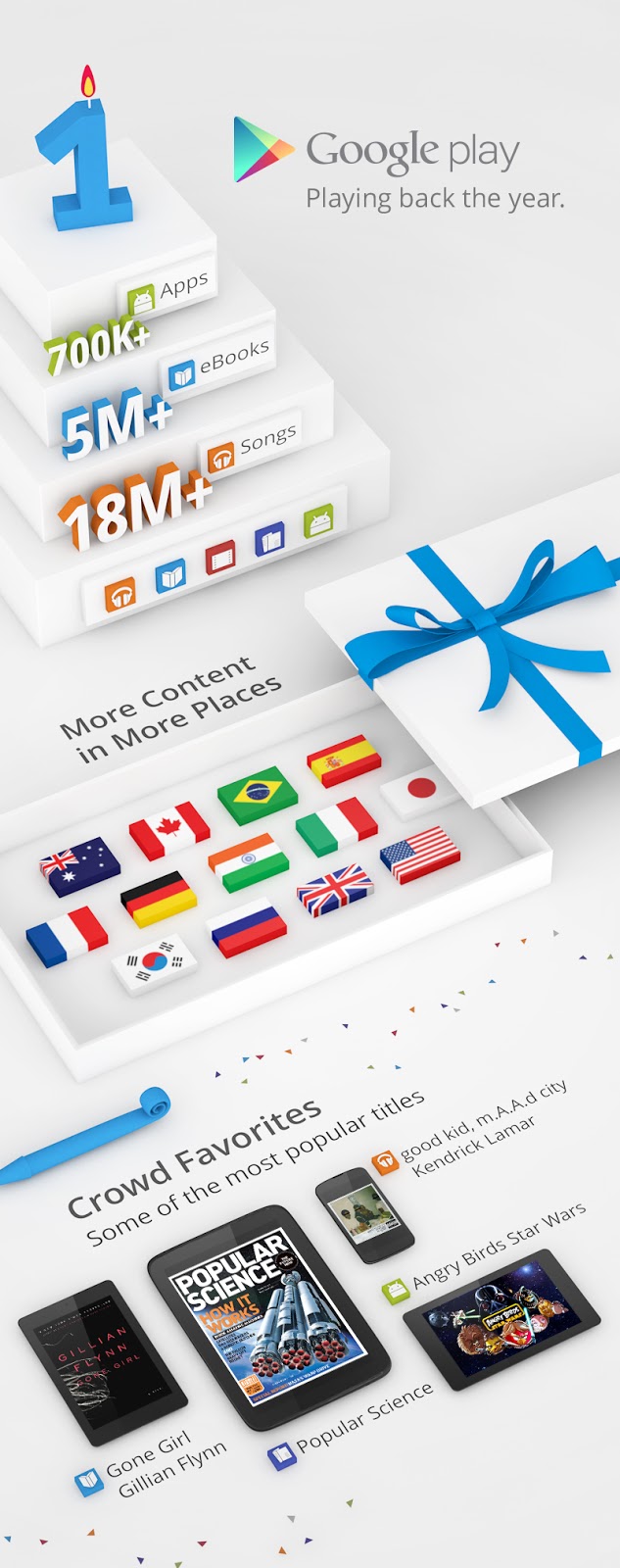
Accessing digital entertainment should be simple, whether you like to read books on your tablet, listen to music on your phone and computer, or watch movies on all three. That’s why one year ago today we launched Google Play, where you can find and enjoy your favorite music, movies, books and apps on your Android phone and tablet, or on the web.
Google Play has grown rapidly in the last year, bringing you more content in more languages and places around the globe. In addition to offering more than 700,000 apps and games, we’ve partnered with all of the major music companies, movie studios and publishers to bring you the music, movies, TV shows, books and magazines you love. And we’ve added more ways for you to buy them, including paying through your phone bill and gift cards, which we're beginning to roll out in the U.K. this week.
Since no birthday is complete without presents, we’re celebrating with a bunch of special offers across the store on songs, TV shows, movies and books. We’re even offering a collection of games with some fun birthday surprises created by developers.
It’s been a busy year, but we’re just getting started. We look forward to many more years of bringing you the best in entertainment!
Making the cloud more accessible with Chrome and Android
Posted by Unknown in accessibility, Android, apps, chrome on Thursday, February 28, 2013
If you’re a blind or low-vision user, you know that working in the cloud poses unique challenges. Our accessibility team had an opportunity to address some of those challenges at the 28th annual CSUN International Technology and Persons with Disabilities Conference this week. While there, we led a workshop on how we’ve been improving the accessibility of Google technologies. For all those who weren’t at the conference, we want to share just a few of those improvements and updates:
Chrome and Google Apps
- Chrome OS now supports a high-quality text-to-speech voice (starting with U.S. English). We’ve also made spoken feedback, along with screen magnification and high-contrast mode available out-of-the-box to make Chromebook and Chromebox setup easier for users with accessibility needs.
- Gmail now has a consistent navigation interface, backed by HTML5 ARIA, which enables blind and low-vision users to effectively navigate using a set of keyboard commands.
- It’s now much easier to access content in your Google Drive using a keyboard—for example, you can navigate a list of files with just the arrow keys. In Docs, you can access features using the keyboard, with a new way to search menu and toolbar options. New keyboard shortcuts and verbalization improvements also make it easier to use Docs, Sheets and Slides with a screenreader.
- The latest stable version of Chrome, released last week, includes support for the Web Speech API, which developers can use to integrate speech recognition capabilities into their apps. At CSUN, our friends from Bookshare demonstrated how they use this new functionality to deliver ReadNow—a fully integrated ebook reader for users with print disabilities.
- Finally, we released a new Help Center Guide specifically for blind and low-vision users to ease the transition to using Google Apps.
Android
- We added Braille support to Android 4.1; since then, Braille support has been expanded on Google Drive for Android, making it easier to read and edit your documents. You can also use Talkback with Docs and Sheets to edit on the go.
- With Gesture Mode in Android 4.1, you can reliably navigate the UI using touch and swipe gestures in combination with speech output.
- Screen magnification is now built into Android 4.2—just enable “Magnification gestures,” then triple tap to enter full screen magnification.
- The latest release of TalkBack (available on Play soon) includes several highly-requested features like structured browsing of web content and the ability to easily suspend/resume TalkBack via an easy-to-use radial menu.
These updates to Chrome, Google Apps, and Android will help create a better overall experience for our blind and low-vision users, but there’s still room for improvement. Looking ahead, we’re focused on the use of accessibility APIs that will make it easier for third-party developers to create accessible web applications, as well as pushing the state of the art forward with technologies like speech recognition and text-to-speech. We’re looking forward to working with the rest of the industry to make computers and the web more accessible for everyone.
More movies and TV shows from Twentieth Century Fox coming to Google Play and YouTube
Posted by Unknown in Android on Tuesday, September 18, 2012
Google Play and YouTube offer the latest new movie releases and your favorite TV shows to enjoy on your Android phone or tablet and on the web. But you’ve been missing one critical thing…Stewie Griffin. We’re happy to share that Stewie, “Family Guy,” and more than 600 other titles from Twentieth Century Fox will soon be joining the catalog for you to rent or buy on Google Play and YouTube.
Today you can buy Fox’s new release Prometheus in HD, available three weeks ahead of the Blu-ray, DVD and video-on-demand release. And over the next few weeks you’ll be able to rent or buy your favorite Fox movies like X-Men, Ice Age and Black Swan, and TV shows like “Glee,” “Modern Family,” “New Girl” and many more.
These new titles will be available first in the U.S., and we’ll be bringing them to more countries soon. We’re now working with all six of the major film studios and many independent studios to bring you the best new releases and your favorite classics to rent or own.
Google Drive: Updates for iOS and Android
Updates for iOS
Starting today, if you’re using the Drive app on your iOS device you can also edit Google documents, just as you can with the Android app. From your iPhone or iPad, you can create a new document, edit an existing one or format text. And, just like on your computer, you’ll be able to see other people’s edits instantly as they’re made.
.png)
Updates for Android
We’re also updating the Drive app for Android phones and tablets today. You can now add comments, reply to existing comments and view tables in your Google documents. And you’ll have the same new abilities to view presentations and organize your stuff as your friends with iPhones do.
More to come...
Looking ahead, we have plenty more planned for the Drive mobile apps—including native editing and real-time collaboration for Google spreadsheets. Stay tuned.
Get Drive in the App Store for your iPhone, iPad or iPod touch and visit the Play Store to get the latest on your Android phone or tablet. To learn more about Google Drive, visit drive.google.com/start.
Posted by Anil Sabharwal, Senior Product Manager
(Cross-posted on the Enterprise and Drive blogs)

 |
 |
 |
 |
 |
 |
 |
 |
 |
 |
 |
 |
 |
 |
 |


