Showing posts with label HTML. Show all posts
Making Post Title Appears Before Blog Title
Posted by Unknown in Blog, Business, Google, HTML, Search engine optimization, Web search engine on Thursday, March 1, 2012
One of the things that I learned from blogger account is that it has a default setting in which blog title appears first before post title. Now, this is a bad news since it is not SEO friendly. Our main goal as a blogger is to share our blogs with other people and get visible online. Therefore, it is a must that our blog is indexed and optimized by those search engines. Anyway, the good thing about making post title appears before blog title is that you can target readers who are interested in your blog content and get return visits. Furthermore, Google only shows a maximum of 70 characters in the title in search results. So it is best to let search engines read and show your post title first just in case you have a very long post title. This is an additional idea from Peter.
Anyway, here are the steps I did to be able to make post title appears before blog title:
- Go to Design Tab.
- Then, click on Edit HTML.
- Before editing your template, back it up by clicking Download Full template.
- You search for this tag: <title><data:blog.pageTitle/></title> or you can press Ctrl+F to search it faster.
- Then, once you found the tag above, replace it with the following code.
<b:if cond='data:blog.pageType == "index"'>
<title><data:blog.title/></title>
<b:else/>
<title><data:blog.pageName/></title>
</b:if>
<title><data:blog.title/></title>
<b:else/>
<title><data:blog.pageName/></title>
</b:if>
- Finally, save your template.
Just wait for your previous blog posts to get re-indexed by search engines. It would take some time. For your new blog post, you can see that your post title will appear first before your blog title by searching on Google. Wait till your blog traffic shows significant increase over the next few days. For now, just enjoy blogging.
How To Embed Donanza Project Board on Blogger Page
Posted by Unknown in Character encodings in HTML, Donanza, HTML, HTML element, Odesk, Web Design and Development, Web page on Monday, January 30, 2012
Days ago, I had a hard time putting up Donanza Project Board on my blogger account. When I signed up, I was given my own Donanza Project Board URL. The picture below shows the page when a visitor click my Donanza URL which is http://bhingaprojects.donanza.com/.

However, I just wanted to embed Donanza Project Board on my web page for the purpose of keeping my blog visitors on my site once they browsed over the project board.They do not have to be navigated to another web page. After days of searching on the internet, I came across this iframe code which is helpful in inserting a web page on my blog. The picture below shows the complete HTML code which I used for my Job Board.
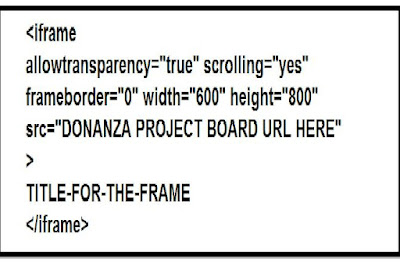
I keyed in my Donanza URL on the iframe code. After a few seconds of integrating this iframe code on my blog, the result is this:

You can try the iframe code above for your blog site. Just feel free to leave your comments regarding your experience.